

Last Updated: November 14, 2026
Quick Summary
Relieve desk strain with short movement breaks, two-minute desk stretches for the neck and back, and a workstation adjusted in order: chair first, then desk, then screen. Build a realistic movement schedule with fallbacks, and respond early to warning signs like tingling or aching that lasts past a short break.
- Stand during every phone call and walk to refill your water instead of keeping a bottle at your desk.
- Hold each desk stretch for 20 to 30 seconds, never bounce, and stop if anything sharpens.
- Set chair height so feet rest flat and knees sit at roughly 90 degrees with thighs parallel to the floor.
- Set the monitor last, with the screen top at or just below eye level about an arm's length away.
- Pick one metric for two weeks, such as the number of days you hit your midday walk.
Table of Contents
- Why Desk Strain Builds Up and What It Does to Your Body
- How to Stay Active at a Desk Job Without Leaving Your Workstation
- Desk Stretches for Neck and Back Pain You Can Do in Two Minutes
- Choosing the Best Lumbar Support Pillow for Your Chair
- Set Up Your Workstation to Reduce Daily Strain
- Spot Warning Signs Early and Respond Before Pain Sets In
- Build a Realistic Movement Schedule Around Your Workday
- Start Your Desk Strain Reset with Qualogic
- Frequently Asked Questions
Why Desk Strain Builds Up and What It Does to Your Body
Desk strain is the physical wear that builds from hours of limited movement and fixed posture.
The reason is simple. Your body is built to move. When you sit still, muscles in the hips and lower back stay switched on for hours. They tire, then tighten.
Most people treat desk strain as a nuisance. It is better read as a signal.
How to Stay Active at a Desk Job Without Leaving Your Workstation
You do not need a gym or a free hour to stay active at a desk job. You need a handful of habits you can repeat without thinking. The best ones take under two minutes and fit between tasks.
Movement breaks that fit real workdays
Start with what is already in your day:
- Stand during every phone call, even short ones
- Walk to refill your water instead of keeping a bottle at your desk
- Take the stairs once a day, not every time
Compression socks are worth a mention here. We carry the Comrad knee-high socks in a 15-20 mmHg everyday level and a firmer 20-30 mmHg version, both in standard and wide-calf sizes. If you have a circulation or skin condition, or diabetes, check with your doctor before using compression.
Desk Stretches for Neck and Back Pain You Can Do in Two Minutes
Desk stretches for neck and back pain are best kept slow, gentle, and short. Hold each one for 20 to 30 seconds.

Try this two-minute routine twice a day:
- Chin tuck: Pull your chin straight back, hold 5 seconds, repeat 10 times
- Shoulder retraction: Squeeze shoulder blades together, hold 5 seconds, 10 reps
- Side neck stretch: Tilt your ear toward one shoulder, hold 20 seconds each side
- Seated spinal twist: Turn your torso to one side, hold 20 seconds, switch
- Wrist and finger stretch: Press palms together, lower hands, hold 15 seconds
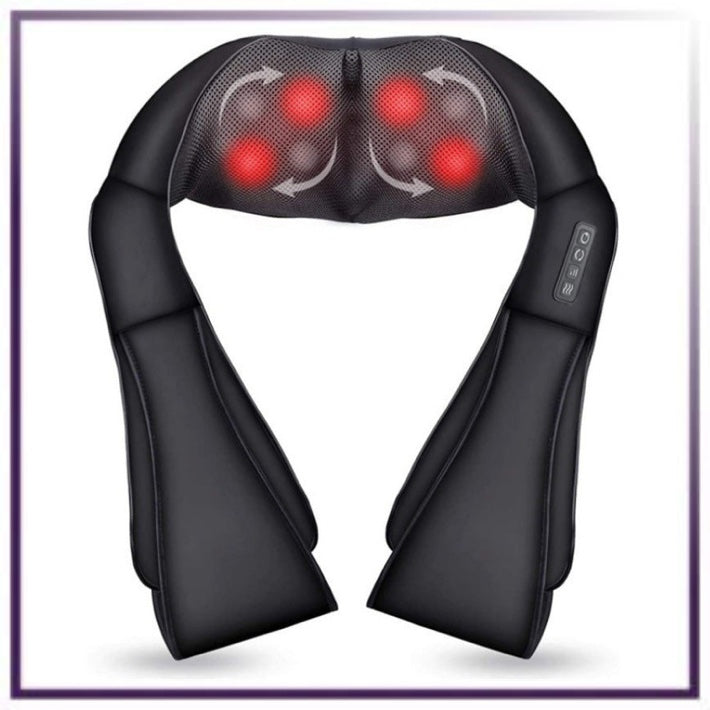
For tension that has already set in, a heat massager can be used between stretch breaks.
Watch out: yanking your neck into a stretch or pushing through pain is a common mistake. Discomfort should fade as you hold.
Choosing the Best Lumbar Support Pillow for Your Chair
A good lumbar support pillow fills the gap between your lower back and the chair without pushing you forward. Fit is the main thing to get right.
Here is how to choose:
- Match the curve: The pillow should support the inward curve of your lower back, not sit above it
- Check the depth: Too thick and it tilts your pelvis; too thin and it does nothing
- Test the height: The top edge should land near your belt line
A lumbar roll works well for car seats and dining chairs too. The principle is the same: support the curve, keep the hips level, and let the shoulders relax back over the spine.
Set Up Your Workstation to Reduce Daily Strain
An ergonomic workstation removes the small forces that add up over a day. You are not chasing a perfect setup. You are removing the obvious mismatches between your body and your equipment. The most useful approach is to adjust in a fixed order, because each change affects the ones after it.
Adjust in this order: chair first, then desk, then screen
Many people start with the monitor and wonder why their back still aches. Work from the ground up instead.
- Set chair height so your feet rest flat. Your knees should sit at roughly 90 degrees, with thighs roughly parallel to the floor. If your feet dangle, use a footrest rather than lowering the chair until your hips drop below your knees.
- Set the lumbar support to your lower-back curve. The top edge should land near your belt line, filling the inward curve without pushing you forward. If the chair's built-in support is too low or too soft, a lumbar roll can bridge the gap.
- Set desk height to your elbows. With shoulders relaxed, elbows should rest near 90 degrees and forearms roughly parallel to the floor. If the desk is fixed and too high, raise the chair and add a footrest; if too low, a keyboard tray can help.
- Set the monitor last. The top of the screen should sit at or just below eye level, about an arm's length away (Working safely with display screen equipment). If you wear progressive lenses, you may need the screen slightly lower so you are not tilting your chin up to see through the reading portion.
- Place the mouse close to the keyboard. Reaching out to the side loads the shoulder and wrist. Keep the mouse within easy reach and consider a compact keyboard to shorten the reach.
Workstation checklist
Work through this list once, then recheck it every few months or after any equipment change:
- Feet flat on the floor or a footrest
- Knees at roughly 90 degrees, thighs parallel to the floor
- Lumbar support at the lower-back curve, top edge near the belt line
Common mismatches and what to do
- Laptop-only setup: A laptop forces a choice between neck strain and wrist strain. A separate keyboard and mouse, plus a stand to raise the screen, resolves both.
- Shared or hot-desked setups: Keep a small kit, a lumbar roll, a footrest, and a compact keyboard, that travels with you so you can recreate the same fit at any desk.
- Home-office constraints: A dining chair can work short-term with a lumbar roll and a footrest, but check that the seat depth lets your back reach the backrest. If the seat is too deep, a cushion behind your back shortens it.
If you want a structured plan for the posture side of this, our guide The Posture Reset walks through the evidence behind screen-driven neck strain and a seven-day action plan.
Watch out: adjusting the monitor before the chair is a common setup mistake. It can leave the spine and hips in a compromised position that screen height alone cannot fix.
Spot Warning Signs Early and Respond Before Pain Sets In
Warning signs are easier to fix at week one than at month six.
Respond early to these signals:
- Aching that lasts past a short break: change position and add a stretch
- Tingling or numbness in the fingers: check wrist position and take more typing breaks
- One-sided shoulder tightness: adjust mouse placement and monitor angle
Repetitive strain from computer use builds slowly. Typing and mouse work load the same small muscles thousands of times a day.
Watch out: numbness, weakness, or pain that wakes you at night needs a clinician, not a stretch routine. Getting it checked early is the practical move.
Build a Realistic Movement Schedule Around Your Workday
A movement schedule only works if it survives a busy day. Most advice stops at "take breaks and set reminders." The practical version is to build a schedule that adapts to the day you are actually having, not the one you planned.
Three workday templates
Start with the template closest to your typical day, then adjust.
| Workday Type | Morning | Midday | Afternoon |
|---|---|---|---|
| Meeting-heavy | Stand on calls, 2-min stretch between meetings | 10-min walk after lunch | Shoulder and wrist reset before the last block |
| Focus-heavy | Stretch before the first task | Stand and walk every hour, even briefly | 2-min stretch at 3 p.m. |
| Mixed | Stretch after the first email batch | Walk at lunch | Heel raises and chin tucks between tasks |
Make it survive a disrupted day
Plans fail when a meeting runs long or a deadline lands. Build a fallback into each template:
- If you miss the midday walk, replace it with two 2-minute standing breaks and a set of heel raises.
- If back-to-back calls trap you, stand during at least one call and do shoulder retractions while listening.
- If you are deep in focus work, use a single cue, such as standing every time you finish a document, rather than a timer you will ignore.
Set cues that tell you what to do
Set two or three phone reminders and label them by action, not by time. "Stand and walk" beats "break" because it tells you what to do. Pair the reminder with a physical cue you already have, a water bottle that empties, a meeting that ends, or a task that finishes, so the habit attaches to something real.
Track one thing only
Measurable progress keeps the habit alive, but tracking everything kills it. Pick one metric for two weeks:
- Number of days you hit your midday walk
- Number of standing calls per day
- A simple 1-5 discomfort rating at 3 p.m. each day
Personalize to your body and setup
If your lower back complains first, prioritize lumbar support and hip movement, and add a short hip-flexor stretch after long sitting. If your neck and shoulders tighten, prioritize screen height and shoulder retraction.
Watch out: building a schedule around a perfect day is a common reason movement plans collapse. Build the fallback first, and the plan is more likely to survive a busy week.
Start Your Desk Strain Reset with Qualogic
Desk strain rarely needs a dramatic fix. It needs a few good habits, a workstation that fits, and tools that earn their place.
Qualogic curates comfort products for exactly this problem, chosen for problem-solving utility rather than volume. If you would rather have that guidance on an ongoing basis, a Qualogic Membership keeps the support and product advice coming as your setup and needs change.
Get started with Qualogic and build a workday that leaves you feeling better at 5 p.m. than you did at noon.
Frequently Asked Questions
How often should you take breaks from sitting at a desk?
A practical rhythm is a short movement break every 30 to 45 minutes, even if it is only standing, rolling your shoulders, or walking to refill a glass of water. Pair each break with a trigger you already have, such as finishing a task or sending an email, so it becomes automatic. Longer breaks of five minutes every hour or two help reset posture and circulation. The exact interval matters less than consistency, because desk strain comes from prolonged static positions rather than any single long day.
What are the best exercises to do at your desk for neck and back pain?
Start with gentle shoulder retraction, where you squeeze the shoulder blades together and hold for five seconds, then release. Add slow neck tilts to each side and a seated spinal twist by rotating your torso while keeping your hips square. A standing hip hinge stretch and a doorway chest opener help counter a rounded sitting posture. Do each movement for 20 to 30 seconds, twice, and stop if anything sharpens. These desk stretches for neck and back pain work best done regularly rather than in one long session.
Do I need the best lumbar support pillow, or will any cushion work?
A lumbar roll helps most when your office chair has a flat or worn backrest that leaves your lower back unsupported. The best lumbar support pillow is one that fills the natural curve of your lower back without pushing you forward, and that stays in place when you shift. Firmness matters: too soft and it collapses, too firm and it feels like a brick. Try a cushion for a week and notice whether you sit taller with less effort. If discomfort continues, check your chair height and monitor position too.
How can I stay active at a desk job when meetings fill my calendar?
Attach movement to things you already do. Stand during phone calls, walk during audio-only meetings, take the stairs once a day, and use the last two minutes before each meeting to stretch. Keep a resistance band in a drawer for quick shoulder and hip work. A simple rule: every time you refill your water, do one lap of the room. Small, repeated bouts of physical activity across the day add up and are easier to sustain than a single gym session.
